

Spotify Receipt: How to Create, Share, and Understand Your Music Stats Receipt (Receiptify & More)
A Spotify receipt turns your real Spotify music listening history into a grainy, thermal-paper-style image. You can share this image on Insta or TikTok in seconds. An often-used Spotify receipt generator tool is Receiptify.
It’s a simple, completely free Spotify receipt online tool. You log in to your Spotify account, select a time range, and download a personalized music receipt showing your top songs and favorite artists. Many people refer to it as a Spotify fake receipt generator because the output looks like a classic store slip, but the data is completely real.
With Spotify now serving more than 760 million users worldwide. It is the world’s most used streaming platform. Receipt-style music summaries continue to trend across Instagram Stories, TikTok, and X, giving fans a fun and nostalgic way to share their music taste. These Spotify tools have become a cultural staple—combining retro receipt vibes with personalized music stats that are perfect for sharing online.
Here you will learn how to make a Spotify receipt. Is it safe and legal? How it compares to Spotify Wrapped and how to resolve common issues. Where to locate your official Spotify billing receipt, if that is what you were seeking.
Spotify Music Receipt vs. Spotify Payment Receipt
A Spotify payment receipt (or Spotify invoice) is the official Spotify subscription receipt you receive when Spotify charges you for a Premium account. You get it via email after each successful payment. It shows your plan, amount paid, payment method, and a transaction ID.
It’s your Spotify order receipt or Spotify Premium receipt—that has zero link to your listening history or habits.
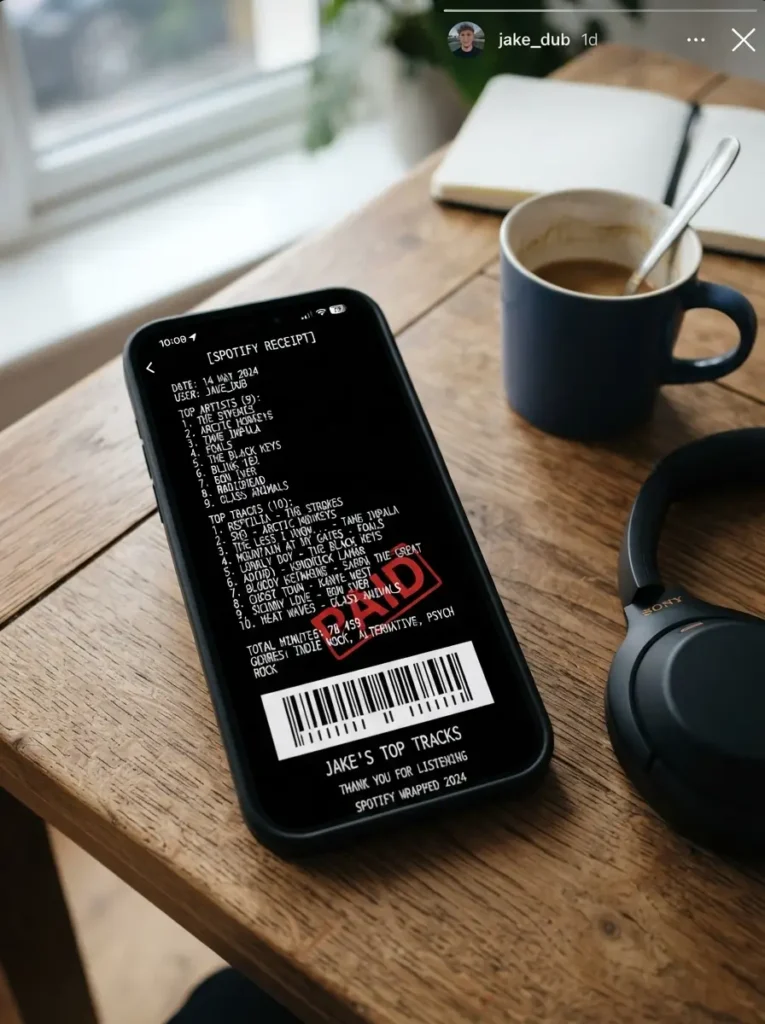
A Spotify music receipt is an unofficial, fan-made graphic that arranges your top songs and artists into a receipt-style format. It’s generated by third-party tools like Receiptify using Spotify’s public API. This Spotify top songs receipt is a snapshot of your music identity, not a financial document. The design often mimics common receipt templates, giving it that authentic cash-register feel.
When you search for the query “Spotify receipt generator” in Google, almost every result is about the music receipt. If you need your actual Spotify billing invoice, skip to the section “How to Download Your Real Spotify Billing Receipt” at the end. The rest of this content focuses on the listening-stat version.
What Exactly Is a Spotify Receipt(Music receipt)?
A Spotify receipt (the most viral receipt trend) is a static image designed to resemble an old-fashioned cash register slip—very much like those universal receipt templates you see in stores. It usually features:
The entire Spotify receipt aesthetic is presented on a dark background with a monospaced Courier-style font. It’s a pure nostalgia play—a lo-fi look in a hyper-digital feed, which is exactly why it spreads so fast on social media and doubles as an Instagram story template Spotify lovers adore.
These receipts are not made by Spotify. They are created by independent developers who tap into the Spotify Web API, which lets authorized apps read your public listening history (top artists, top tracks, and listening time) with your permission.
A Spotify receipt is a creative way to showcase your music taste, whereas a paper receipt is a formal document used for accounting, record-keeping, and proof of purchase. Explore our complete guide to understand how paper receipts work and when they are used.
What is Receiptify?
Receiptify is a free web app created by developer Michelle Liu in 2020. It started as a small coding project and skyrocketed almost overnight on TikTok and Instagram. The concept is dead simple: log in with your Spotify (or Apple Music, or Last.fm) account, choose a time period, and the tool instantly turns your listening data into a Spotify streaming receipt image.
Some key facts worth knowing:
It’s completely free and ad-free.
There’s no mobile app—you visit receiptify.herokuapp.com in your browser.
Because it runs on a free Heroku server, you may occasionally see a “too many requests” error when traffic spikes. Waiting a few minutes usually fixes it.
It hasn’t been updated into a slick paid product, and that minimalism is part of its charm.
Beware of copycat domains. The official URL is exactly as above. Fake sites might ask for extra permissions or try to serve ads. The real Receiptify only asks for read-only access to your account data and activity.
How Receiptify Actually Works (So You Know It’s Safe)
Understanding the flow helps you feel confident about what you’re agreeing to. Here’s what happens when you hit that login button:
You visit Receiptify and click “Log in with Spotify.”
Spotify’s own authorization page opens. You’re entering your password on Spotify.com, not on Receiptify.
Receiptify requests two permissions: view your account data and view your activity. These are read-only – the tool can’t modify playlists, follow artists, post anything, or see your payment details.
After you agree, Spotify issues a temporary access token.
Receiptify uses that token to fetch your top artists, top tracks, and listening time for the chosen range (last month, last 6 months, or all time) from Spotify’s API.
All the image assembly happens directly in your browser using a JavaScript library. Your listening data is not stored on any server. Once the token expires (quickly), the connection ends.
This is the same OAuth method used by apps like Discord and Tinder for Spotify integration. It’s as secure as a read-only third-party connection can be.
How to Generate Your Own Spotify Receipt?
Here’s the quickest path to learn how to make a Spotify receipt, whether you’re on a phone or desktop.
Go to the official site. Open your browser and visit receiptify.herokuapp.com. Avoid any site that asks you to download something.
Log in with Spotify. Tap the button. You’ll land on Spotify’s login page. Enter your credentials there. (If you’re already logged into Spotify on your device, this step may be instant.)
Check the permissions. You’ll see exactly what the app wants: “View your Spotify account data” and “View your activity on Spotify.” Click “Agree.” You can
this later from your Spotify account settings.
Choose your time range. You’ll see three options:
Last Month – Perfect for a current-vibe receipt. If you stream a lot, this looks full and accurate.
Last 6 Months—A solid mid-range snapshot.
All Time—Your lifetime top tracks and artists according to Spotify’s API.
Select how many items you want. Newer versions let you pick Top 10, Top 25, or Top 50 tracks and artists.
Wait a moment. The tool pings Spotify’s API and assembles the receipt. If you get a “too many requests” or blank screen, refresh after a few minutes or try an incognito browser window.
Save or share. On desktop, right-click and save the image. On mobile, long-press and select “Save to Photos” (iPhone) or “Download image” (Android). If the download option doesn’t appear, a simple screenshot works perfectly – that’s what most people do to get their Spotify screenshot generator fix.
Understanding the Receipt Layout: QTY, AMT, and Those Dummy Numbers
Many people wonder what “QTY” and “AMT” mean on a Receiptify receipt. They are purely aesthetic, designed to resemble a real store slip.
QTY (Quantity) displays the duration of the track in minutes and seconds, like 3:52. It’s not a play count.
AMT (Amount) is a fixed placeholder, usually 1.00. There’s no real price; every track is “worth” the same arbitrary unit.
The “Total” line at the bottom is your total listening time for the period, shown in minutes.
The barcode, card number, and authorization code are generated just for the look. They don’t encode any personal data.
The font is a Courier-style monospaced typeface. There’s no built-in option to change the font or colors, but a few third-party alternatives (discussed later) offer light-mode receipts or slightly different styling.
Extra Features
Receiptify later added a couple of fun personality layers.
Roast Me – After your receipt loads, you might see a “Roast Me” button. Click on it, and Receiptify generates a brutally funny, AI-style commentary about your music taste based on your top artists and tracks.
Be Nice—The kinder version. It gives you a compliment or lighthearted affirmation instead.
Get Image – This button downloads the receipt as a PNG file without the browser UI.
These features are all in-browser and don’t require any extra permissions.
Creative Ways to Use Your Spotify Receipt
The obvious move is sharing it on your story, but people find a bunch of other uses once they start playing with the tool.
Monthly time capsule. Print your receipt at the end of each month and stick it in a journal.
Gift idea for a friend. Generate a receipt for a month that meant something to both of you—a road trip or a summer together—and print it on textured paper. If you want to go all-in on the joke, combine it with a customized Walmart receipt template for a funny dual presentation.
Year-over-year taste tracking. Save your “all-time” receipt once a year and compare.
Group comparison game. In a group chat, everyone generates a receipt for the same time range and shares it. The conversations that follow are often hilarious.
These ideas turn a simple personalized playlist receipt into a real-world keepsake.
Receiptify vs. Spotify Wrapped
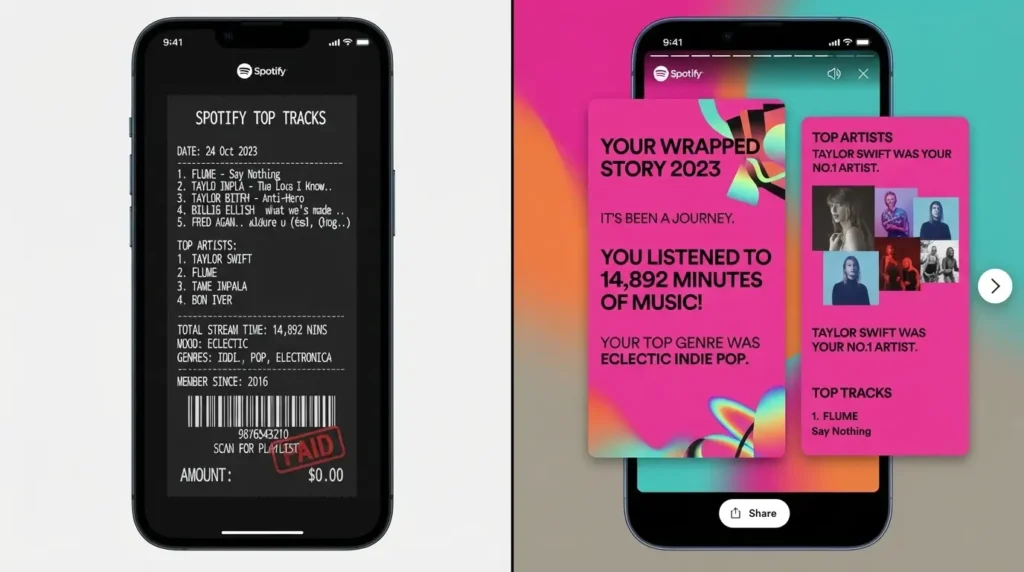
People often treat Receiptify and Spotify Wrapped as competitors, but they serve completely different purposes.
Receiptify Spotify Wrapped
If you’re asking, “What’s the Spotify receipt vs. Spotify Wrapped difference?” —Wrapped is the annual cultural event, while the Spotify Wrapped receipt style from Receiptify is your anytime stat fix.
Receiptify Alternatives: Spotify Pie, Instafest, Obscurify, and More
If you want your Spotify stats presented in a completely different visual style, there are several reputable music receipt generator alternatives.
Spotify Pie – Creates a colorful pie chart breaking down your top genres.
Instafest – Generates a fake music festival lineup poster based on your top artists.
Obscurify – Gives you an obscurity score.
Stats.fm (formerly Spotistats) – A deep-dive stats app.
Last.fm – The original music tracking platform.
Kaleidosync – A visualizer for your currently playing track.
Manual receipt template makers
A few websites let you type in any song list, fake prices, and custom store names to create a printable, vintage-thermal receipt image. These are perfect if you want total creative control. If you need a custom receipt generator that doesn’t connect to Spotify, these template-based tools are exactly what you’re looking for. You can also find Spotify receipt template options that look exactly like the Receiptify layout for hand-picked lists.
Which One Should You Use?
Want a fast, automatic snapshot? → Receiptify (best Spotify receipt maker website 2026)
Curious about your genre spread? → Spotify Pie
Love the festival poster aesthetic? → Instafest
Want to know how obscure your music taste is? → Obscurify
Need lifetime stats and detailed charts? → Stats.fm
Want full manual control? → A template‑based fake receipt maker online or a Spotify collage maker
These Spotify data visualizer tools answer different questions about your listening.
How to Download Your Actual Spotify Billing Receipt (Payment Invoice)
If you were looking for your official Spotify invoice download, here’s how to find it.
From Email: After every successful payment, Spotify sends a Spotify payment receipt to the linked email. Search for “Your Spotify receipt” or “Payment confirmed.”
From Your Spotify Account Page: Go to spotify.com/account → “Your plan” → “Receipts” or “Order history.” You can view and download the invoice as a PDF.
This official receipt is your financial record, completely separate from the Spotify listening stats ones.
Is Receiptify Safe? What About Data Storage?
Yes – when you use the real site, Receiptify is safe. You never give away your password; permissions are read‑only, and data is not stored. Revoke access anytime from your Spotify account settings.
Troubleshooting Receiptify: No Data, Blank Screen, Download Issues
Frequently Asked Questions
What is a Spotify receipt?
A graphic that arranges your top songs and artists into a store-receipt look, made by third-party Spotify receipt generator tools.
Is Receiptify safe to use?
Yes, on the official site. Read‑only access, no password sharing.
How do I make a Spotify receipt?
Visit Receiptify, log in, pick a time range, and download. That’s also the answer to “Spotify receipt kaise banaye.”
Can I get a receipt without logging in?
No, but you can use a manual Spotify receipt template maker where you type the songs yourself.
Does Receiptify work with Apple Music or YouTube Music?
It supports Spotify, Apple Music, and Last.fm. There is no direct YouTube Music receipt integration, but an Apple Music receipt can be created with the same tool.
Can I get banned for using Receiptify?
No. It’s an authorized API integration.
If you’re a developer interested in building your own personalized data visualization tool, check out the official Spotify Web API reference to understand how top tracks and artists are fetched.
Spotify receipts have stuck around because they’re fast, shareable, and personal. Receiptify remains the quickest way to turn your real listening into something that looks like a crinkled diner receipt.
For different angles, keep Spotify Pie, Instafest, and Stats.fm bookmarked. And if you were hunting for your Spotify subscription receipt, you now know exactly where to grab it.
