Freelance Receipt/ Create Professional Freelance Receipts Online Free
Whether you’re a graphic designer in New York, a developer shipping code from Berlin, or a consultant in Mumbai, getting paid is the best part of the gig-until you realize the paperwork comes for you anyway. Tax season rolls around, a client asks for a proper receipt to close their books, or your accountant demands proof of that international bank transfer, and suddenly you’re searching “how to make a receipt” at midnight. That’s exactly where a purpose – built freelance receipt steps in, and I say that as someone who has spent over a decade helping independent professionals keep their financial documentation clean, compliant, and client – ready.
Most freelancers start with a Word template they found on page three of Google. The columns break, the tax calculation is off, and it looks nothing like the polished brand you’ve built. You might even leave out a mandatory field-like a sequential receipt number or your business registration ID-that an auditor or a sharp client will flag. I’ve seen those mistakes trigger payment delays, tax filing rejections, and uncomfortable “can you reissue this?” emails.
Our receipt creator prevents all of that. You fill in a few essential details-client name, service description, amount, payment method-and the tool automatically generates an audit – ready PDF with proper formatting, tax breakdowns, and your logo. No design skills, no manual alignment, and absolutely nothing stored on a server you don’t control.
In less than sixty seconds, you go from “I’ll deal with it later” to having a crisp, professional receipt that mirrors what a boutique agency would deliver. That means you spend zero time wrestling with spreadsheet formulas or outdated templates, and all your energy goes back to the creative or technical work you actually love-and get paid for.
Freelance Receipt
Thermal Preview
80mm| Service | Hrs | Rate | Amount |
|---|
Pro Freelance Receipt Maker – 12 Unique Designs
Each template has distinct styling, font, and layout.
Live Preview
As a freelancer, your brand encompasses not only your work but also the professionalism you exhibit upon completing a deal.
One Fast Tool for Invoices, Receipts, and Total Peace of Mind
You can use these tools to create a quick freelance invoice to start a project or a final receipt to close one out. This fast, professional way to document your income ensures you stay organized while looking like the pro you actually are. No more scrambling for a template at midnight or worrying whether your records will hold up at tax time-just a straightforward process that handles the paperwork while you focus on your craft. In minutes, you go from “payment received” to “receipt sent” with a workflow that finally matches how hard you work.
Look Like the Pro You Are-Right Through to the Receipt
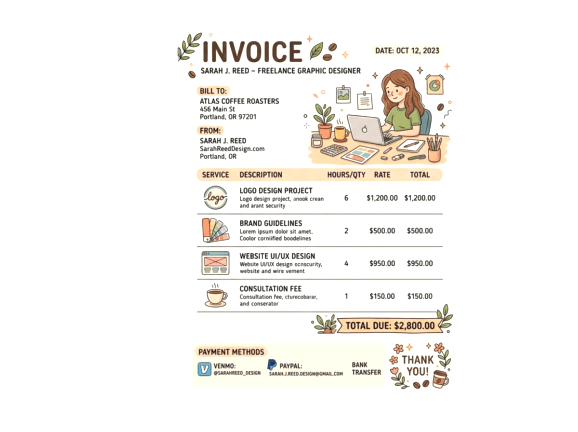
Using a dedicated freelance invoice generator enables you to turn a simple payment into a formal record instantly. These receipt tools act like a lightweight freelance invoice app, helping you create clean, polished PDFs that build client trust and provide must-have payment proof for tax tracking. Every document you send-whether it’s a deposit invoice or a final receipt-can carry your logo, your brand colors, and a clear breakdown of services, so you close every project looking as sharp as the work you delivered.
Freelance Invoice FAQs
Quick answers to your most pressing billing questions from a real freelancer who’s been there
What’s the best way to create a professional freelance invoice when starting out?
Skip fancy templates at first—just use a simple freelance invoice generator with your name, client details, clear service description, and total amount. I started with basic templates and upgraded as my business grew—looking professional from day one builds trust with clients.
Where can I find genuine freelance invoice examples that actually work?
Ask other freelancers in your field what they use—most ‘perfect’ examples online are made by people who’ve never invoiced real clients. I keep mine clean: my logo, clear line items, payment terms (‘Net 15’ works for me), and multiple payment options. Clarity beats fancy design every time.
What should be in a self-employed freelance invoice to ensure payment?
Your contact info, client details, unique invoice number, date, detailed service description (not just ‘consulting’), itemized costs, total amount, payment terms, and payment options. I learned the hard way that vague descriptions = delayed payments.
How do I create a professional graphic design invoice without wasting time?
Keep your branding consistent but minimal—use your logo and one accent color. Clients care more about clarity than creative invoices. I include high-level descriptions like ‘Website Homepage Design – 3 revisions’.
What’s the real difference between basic and premium freelance invoice software?
Free templates require manual entry. Premium options track time automatically, handle multiple currencies, and show real-time payment status.
Can I use Google Docs for freelance invoices, or should I upgrade?
Google Docs works fine for occasional side gigs, but as your business grows, you’ll hit limitations. Proper software pays for itself.
How do I invoice as a freelancer for the first time without looking inexperienced?
Be direct but friendly. I now invoice within 24 hours of completing work—this reduced my average payment time significantly.
Why is a freelance invoice generator better than manual invoices?
It eliminates calculation errors, creates professional paper trail with automatic numbering, and has payment tracking.
What are the absolute essential elements every freelance invoice must include?
Unique invoice number, clear service description, dates, your details, client’s info, itemized costs, total, payment terms, and payment options.
How often should I send freelance invoices for good cash flow?
Invoice immediately upon project completion with ‘Due upon receipt’ terms. For ongoing work, weekly or biweekly is best.
What’s the best freelance invoice app if I’m constantly on the move?
Look for something that works offline, syncs across devices, and lets you create invoices on the spot.
How can I structure invoices to get paid faster without being pushy?
Use clear descriptions, ‘Due upon receipt’ terms, and multiple payment options. Invoice immediately upon delivery.
Ready to Create Professional Invoices?
Get started with our free freelance receipt maker. You can also create any other custom, beautiful, professional receipts in seconds – no design skills needed.
Receipt Generator